
Overview
If you are using Impossible Cloud as a free trial, you can easily upgrade your account to a monthly subscription or production account by following the steps in this article. The process depends whether you are an end-customer using the Storage Console (ICSC) or an partner that is using the Management Console (ICMC).
This article consists of 2 sections:
- Converting a trial storage account as an end-customer in ICSC
- Converting a trial partner account as an MSP or reseller in ICMC.
For more information, please see the article explaining the difference between Impossible Cloud Management Console (ICMC) and Impossible Cloud Storage Console (ICSC).
Converting a trial storage account as an end-customer in ICSC
You can upgrade your trial storage account by starting a monthly subscription directly from ICSC. You can securely submit your payment details by following the steps described below:- Login to your account in ICSC.
- Go to the Usage page listed on the S3 Storage menu panel. Please refer to the screenshots below for more details:
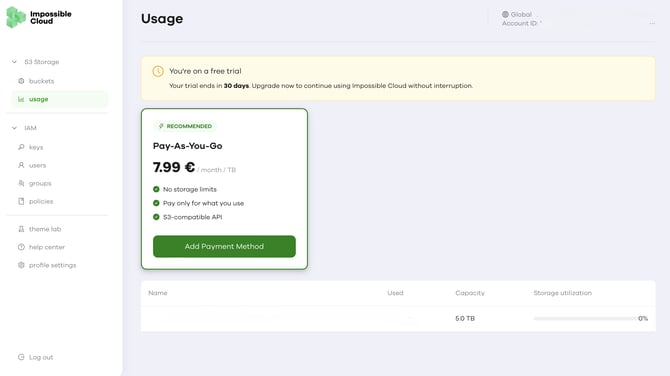
- Click “Add Payment Method” and you will be redirected to our billing portal.
- In the billing portal, please fill in your card details and submit the form.
After you submit your payment details, your trial storage account is converted to a paid subscription and remains fully available, so you can continue using your account without any interruption.
On the first day of every month, Impossible Cloud will charge you with your average daily storage usage over the period of time. There is a minimum monthly charge that is equivalent to a 1 (one) TB usage every month.
Converting a trial partner account as an MSP or reseller in ICMC
As a channel-first company, Impossible Cloud aims to understand your needs and connect you with the right partners. You can get access to our exclusive partner pricing and additional benefits.
To get started, follow these steps to schedule a consultation with our experts:
- Login to your account in ICMC.
- Go to the Account settings page from the menu panel.
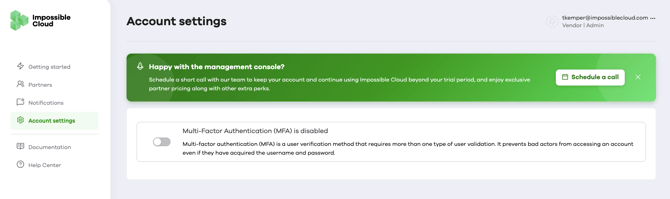
- Click “Schedule a call” and choose your language and the time to talk to our experts.
Once the call is scheduled, your ICMC trial will remain active until the scheduled session with our experts.
Conclusion
Whether you are an end-customer or an MSP/reseller, converting your trial account is straightforward and can be done directly through the Impossible Cloud Storage Console or the Impossible Cloud Management Console, respectively.